Hacking My Keychron K2 Pro to Report Its Battery to macOS
The Battery Indicator Keychron Never Shipped
My AirPods and my mouse both tell my Mac their battery level. My Keychron K2 Pro, the keyboard I type on all day, tells it nothing, so when it dies, it dies mid-sentence.
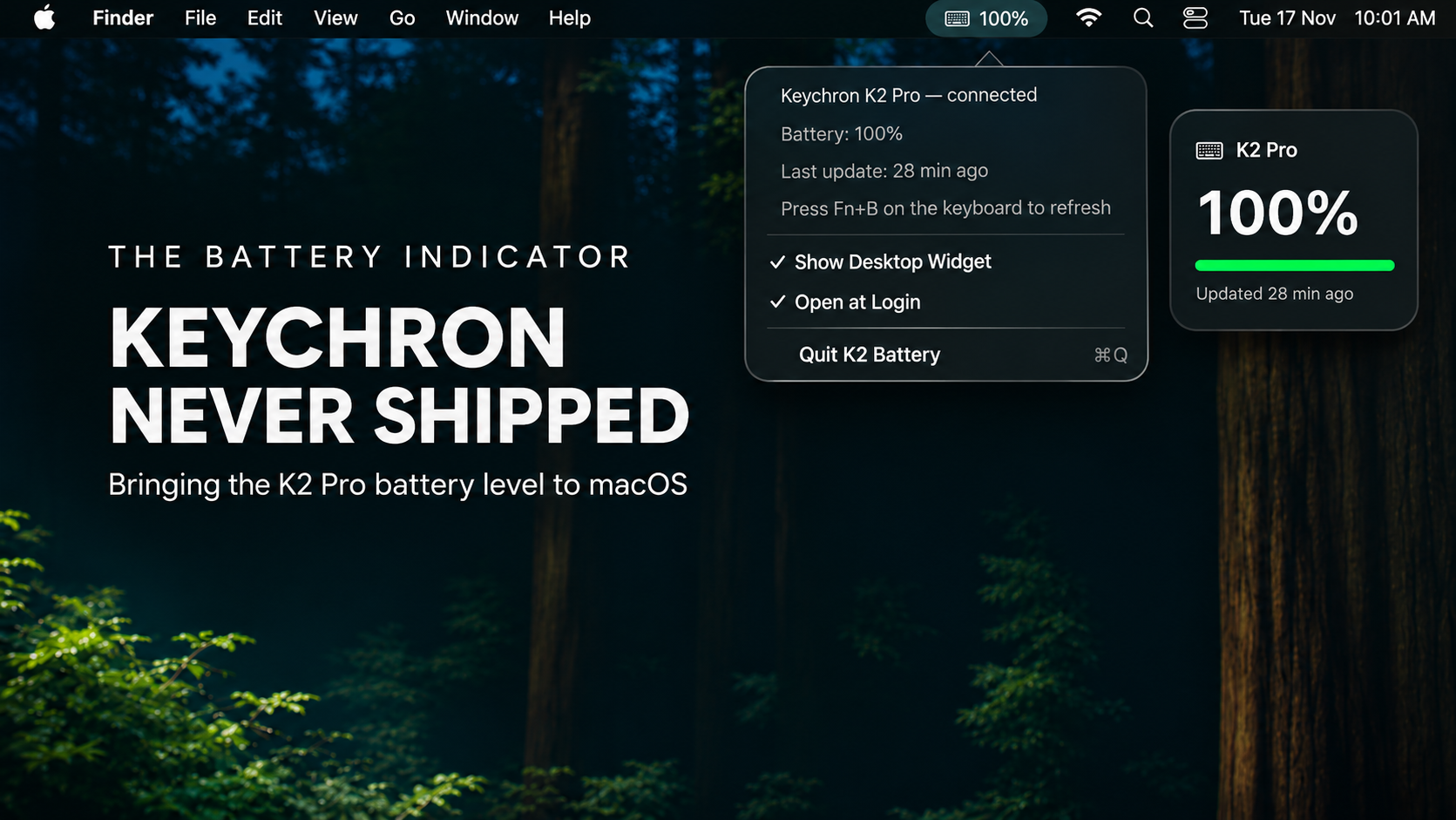
So I built the feature myself: a small firmware change for the keyboard and a menu bar app for the Mac. My Mac now shows the K2 Pro's battery percentage in the menu bar and in a desktop widget, and it updates on its own while I type.
I built it with Claude Code as my pair programmer. We went through Keychron's QMK source together, and it helped me write both the firmware change and the Swift app, then sort out the build errors and macOS permission problems as they came up.
Below is how it all works and how to build your own, including the parts that went wrong.
Why macOS can't see the battery
My first guess was that macOS simply had no way to display it. I was wrong. The keyboard never sends it in the first place.
You can see this by asking macOS what it knows about connected Bluetooth devices:
system_profiler SPBluetoothDataType
My AirPods show Left Battery Level: 84% and so on. The K2 Pro shows only this:
Keychron K2 Pro:
    Vendor ID: 0x3434
    Product ID: 0x0221
    Firmware Version: 1.3.2
    Services: 0x800020 < HID ACL >
No battery, and no GATT. The K2 Pro uses classic Bluetooth HID, not Bluetooth Low Energy, so the standard Battery Service that most modern mice use isn't there.
I then dumped the keyboard's HID report descriptor, which is the list of data a USB or Bluetooth input device says it can send:
ioreg -r -l -w0 -c IOHIDDevice | grep ReportDescriptor
It lists a normal keyboard, an N-key-rollover keyboard, media keys, system power keys and a mouse (for mouse keys). There's no battery field anywhere, so no app on the Mac could ever read one.
Two chips, one of them closed
The K2 Pro actually has two chips:
- An STM32L432 microcontroller running QMK, the open-source keyboard firmware Keychron publishes.
- A separate Bluetooth module running Keychron's closed firmware.
The Bluetooth module decides what the keyboard looks like to the Mac, and nobody outside Keychron can change it. The QMK chip, though, knows the battery level. That's how Fn + B works: the number row lights up to show the charge.
Keychron's QMK source even has a function for it:
uint8_t battery_get_percentage(void);
So the keyboard knows its battery level and has no proper way to report it. The only thing it can send over Bluetooth is keypresses, so I decided to send the battery level as keypresses.
The idea: send the battery level as a burst of keypresses
Most keyboards don't have keys F13–F24, and macOS does nothing with most of them. If the keyboard "presses" a few of those unused keys in a specific pattern, a small Mac app can catch them, decode the battery level and swallow them so no other app ever sees them.
My format:
F20, d0, d1, d2, d3, checksum, F20
- F20 marks the start and end.
- F16, F17, F18 and F19 stand for the digits 0, 1, 2 and 3.
- d0–d3 are an 8-bit value written in base 4. Bits 0–6 hold the percentage (0–100), and bit 7 is set if the USB cable is plugged in.
- The checksum is
(d0 + d1 + d2 + d3) % 4, so a garbled burst gets thrown away instead of showing a wrong number.
I avoided F13–F15 on purpose, because macOS uses F14 and F15 for screen brightness on external keyboards.
Each update is seven keypresses, which takes a few milliseconds over Bluetooth.
Part 1: The firmware
Read this first. Flashing custom firmware is at your own risk. The K2 Pro is very hard to permanently break (more on that below), but download Keychron's official firmware for your exact model before you start so you can always go back.
Step 1: Find your exact model
The K2 Pro comes in six versions (ANSI/ISO/JIS × RGB/white backlight), and each needs its own firmware file. The USB Product ID tells you which one you have:
| Product ID | Variant |
|---|---|
0x0220 |
ANSI RGB |
0x0221 |
ISO RGB ← mine |
0x0222 |
JIS RGB |
0x0223 |
ANSI white |
0x0224 |
ISO white |
0x0225 |
JIS white |
Check yours with system_profiler SPBluetoothDataType.
Step 2: Get Keychron's source
The K Pro series firmware lives on the bluetooth_playground branch of Keychron's QMK fork. A shallow clone keeps the download small:
git clone --depth 1 --branch bluetooth_playground \
  https://github.com/Keychron/qmk_firmware.git
cd qmk_firmware
git submodule update --init --depth 1 lib/chibios lib/chibios-contrib lib/printf
Step 3: Install the toolchain (no Homebrew QMK setup needed)
I downloaded ARM's official Arm GNU Toolchain for Apple Silicon (darwin-arm64, arm-none-eabi) and unpacked it into a folder, so I didn't need an admin password. QMK's Python tools went into a virtual environment:
python3 -m venv venv
./venv/bin/pip install -r qmk_firmware/requirements.txt qmk

export QMK_HOME="$PWD/qmk_firmware"
export PATH="$PWD/toolchain/arm-gnu-toolchain-13.3.rel1-darwin-arm64-arm-none-eabi/bin:$PWD/venv/bin:$PATH"
Step 4: Write the keymap
I copied Keychron's stock via keymap into a new keymap folder, battery_widget, so every key, Fn layer and VIA setting stays exactly as it was. Then I added my code at the end without removing or changing anything.
keyboards/keychron/k2_pro/iso/rgb/keymaps/battery_widget/
├── keymap.c   ← stock VIA keymap + battery broadcaster
└── rules.mk   ← VIA_ENABLE = yes
Here's the part that builds and sends the burst:
#include "transport.h"
#include "bluetooth.h"
#include "battery.h"
#include "lpm.h"

static const uint16_t bw_digit[4] = {KC_F16, KC_F17, KC_F18, KC_F19};

static void bw_send(void) {
    uint8_t pct = battery_get_percentage();
    if (pct > 100) pct = 100;
    uint8_t value = pct | (usb_power_connected() ? 0x80 : 0x00);

    uint8_t d[5];
    d[0] = (value >> 6) & 3;
    d[1] = (value >> 4) & 3;
    d[2] = (value >> 2) & 3;
    d[3] = value & 3;
    d[4] = (d[0] + d[1] + d[2] + d[3]) & 3;

    tap_code(KC_F20);
    for (uint8_t i = 0; i < 5; i++) tap_code(bw_digit[d[i]]);
    tap_code(KC_F20);
}
Deciding when to send matters more. These fake keypresses must never get mixed up with real typing or wake a sleeping Mac, so the keyboard only sends when all of these are true:
- it's connected over Bluetooth,
- the battery reading has settled after power-on,
- no keys or modifiers are held down,
- you've paused typing for 1.5 seconds,
- you've typed in the last minute, so a sleeping Mac never gets woken.
When those hold, it sends shortly after every (re)connection, every 5 minutes while you're typing, and right after Fn + B, the built-in battery check.
void housekeeping_task_user(void) {
    bool connected = get_transport() == TRANSPORT_BLUETOOTH &&
                     bluetooth_get_state() == BLUETOOTH_CONNECTED;
    if (!connected) { bw_was_connected = false; return; }
    if (!bw_was_connected) { bw_was_connected = true; bw_requested = true; }

    if (battery_power_on_sample()) return;   // readings not settled yet

    if (!bw_requested && bw_have_sent &&
        timer_elapsed32(bw_last_sent) >= BW_INTERVAL_MS) bw_requested = true;
    if (!bw_requested) return;

    uint32_t idle = last_input_activity_elapsed();
    if (idle < (bw_manual ? BW_MANUAL_IDLE_MS : BW_IDLE_MS) || idle > BW_ACTIVE_MS) return;
    if (get_mods() || !bw_matrix_idle()) return;

    bw_send();
    bw_requested = bw_manual = false;
    bw_have_sent = true;
    bw_last_sent = timer_read32();
}

bool process_record_user(uint16_t keycode, keyrecord_t *record) {
    if (keycode == BAT_LVL && !record->event.pressed) {   // Fn + B released
        bw_requested = bw_manual = true;
    }
    return true;
}
Step 5: Build
make keychron/k2_pro/iso/rgb:battery_widget
I hit two snags:
implicit declaration of function 'usb_power_connected': it's declared inlpm.h, so add#include "lpm.h".dfu-suffix: command not foundat the very end. That step only adds optional metadata, and the.binfile is already in.build/by then, so you can ignore it.
Step 6: Check it before flashing
I was nervous about breaking the keyboard, so I compared the file with Keychron's official firmware before flashing:
- Startup header: the first 8 bytes (initial stack pointer and reset address) matched Keychron's official
.bin:20000400 080002bd. - Size: I also built Keychron's stock keymap from the same source. Mine was only 356 bytes bigger, which is exactly the new code.
- Keymap changes: a diff against the stock keymap showed 0 lines removed.
Step 7: Flash it
The K2 Pro's update mode (STM32 DFU) is built into the chip's read-only memory, so a bad flash can't erase it. That's why the keyboard is so hard to permanently break.
brew install dfu-utilSet the keyboard's side switch to Cable and plug it in with a data cable, directly rather than through a hub.
Unplug it, hold Esc, plug it back in, and keep holding Esc for a couple of seconds. The backlight stays off when it worked. (It took me two tries.)
Check the Mac can see it:
dfu-util -l # look for [0483:df11] ... "@Internal Flash /0x08000000"Flash only the main flash memory (
-a 0), not the chip's settings areas:dfu-util -a 0 -d 0483:df11 -s 0x08000000:leave \ -D keychron_k2_pro_iso_rgb_battery_widget.bin
About ten seconds later I got Download done. The keyboard rebooted and came back as a normal Keychron K2 Pro.
If Esc doesn't work (for example because the firmware is broken), there's a reset button under the spacebar. Hold it while plugging in and you can always flash Keychron's stock firmware again.
Part 2: The Mac app (no Xcode required)
I didn't have Xcode installed, and it turns out you don't need it for this. Apple's Command Line Tools include swiftc, which can build a complete AppKit + SwiftUI app as long as you put the .app folder structure together yourself.
Catching the keys
The app is built around a CGEventTap, a hook that sees every keypress before any app does. It watches for F16–F20, feeds them to the decoder and returns nil so those keys disappear:
private func keyTapCallback(proxy: CGEventTapProxy, type: CGEventType,
                            event: CGEvent, refcon: UnsafeMutableRawPointer?) -> Unmanaged<CGEvent>? {
    if type == .tapDisabledByTimeout || type == .tapDisabledByUserInput {
        KeyTap.shared.reenable()
        return Unmanaged.passUnretained(event)
    }
    let keycode = event.getIntegerValueField(.keyboardEventKeycode)
    guard Key.all.contains(keycode) else { return Unmanaged.passUnretained(event) }
    if type == .keyDown && event.getIntegerValueField(.keyboardEventAutorepeat) == 0 {
        KeyTap.shared.decoder.feed(keycode)
    }
    return nil   // swallow F16–F20
}
The decoder collects the five digits between two F20s, checks the checksum, and rejects anything over 100% or any frame that takes longer than 2 seconds.
What it shows
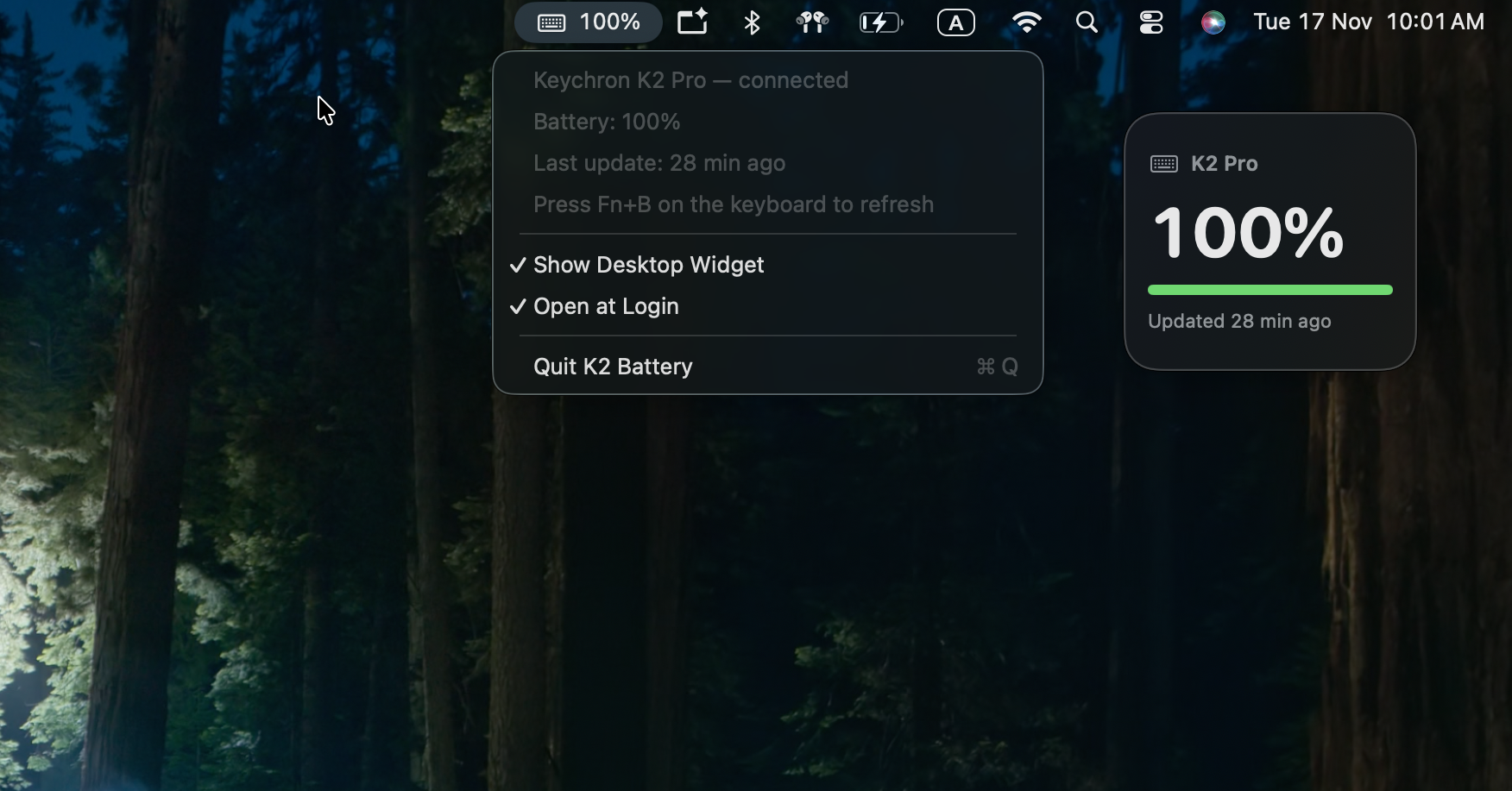
The menu bar shows a keyboard icon and the percentage (⌨ 73%). It turns red at 20% or below, greys out when the keyboard is disconnected or the reading is more than 30 minutes old, and shows ⚡ while the cable is plugged in.
There's also a small floating desktop panel with the percentage, a battery bar and "Updated 3 min ago". You can drag it anywhere, and it appears on every Space.
The app checks whether the K2 Pro is connected through IOBluetooth, and Open at Login uses a simple LaunchAgent.
Building it
swiftc -O -swift-version 5 -target arm64-apple-macos14 \
  -framework AppKit -framework IOBluetooth -framework SwiftUI \
  -o "K2 Battery.app/Contents/MacOS/K2Battery" main.swift
codesign --force --sign - "K2 Battery.app"
You also need a small Info.plist with LSUIElement = true, so the app lives only in the menu bar with no Dock icon.
The Accessibility gotcha
Intercepting and hiding keypresses needs Accessibility permission, and two things about it confused me:
The app didn't notice the permission until I restarted it. I switched it on in System Settings, and nothing happened until I quit and reopened the app.
Every rebuild loses the permission. An app signed with
codesign --sign -(ad-hoc, meaning no certificate) is identified by an exact fingerprint of its files. Rebuild it and macOS treats it as a different app, even though the switch in System Settings still looks on. The fix:tccutil reset Accessibility local.k2batteryThen grant the permission again and restart the app.
The moment it worked
With the new firmware on the keyboard and the app running, I switched the keyboard to Bluetooth, typed a sentence, paused and pressed Fn + B.
The menu bar changed to ⌨ 100%, sent from the keyboard as seven keypresses.
(100% made sense: it had just been charging over the cable while I flashed it. Keychron's own formula also counts anything above 4.1 V as full, so it reads 100% for a while before it starts dropping.)
Limitations
- I've only tested the firmware on my K2 Pro ISO RGB. Other K Pro and Q Pro models use the same codebase and should work with their own build, but I haven't tried them.
- The original K series won't work. The non-Pro K2, K6 and so on don't run QMK, so their firmware can't be replaced.
- F16–F20 are reserved while the app runs. If the app isn't running, those keys reach whatever app you're in. That's harmless almost everywhere, but worth knowing.
- Readings with the cable plugged in are approximate, because the battery voltage reads higher while charging.
- It isn't a native macOS widget yet. I wrote a real WidgetKit widget and built it without Xcode, and macOS registered it but refused to show it in the widget gallery. Widgets need an Apple-issued signature, which means Xcode and an Apple ID. For now, the floating desktop panel does the job.
- Updates come every few minutes, not live. That's deliberate, so the keyboard isn't constantly sending keypresses.
Wrapping up
The battery level was on the keyboard the whole time. With the Bluetooth chip closed, keypresses were the only way to get it out. It's a hack, but it works, and my keyboard shouldn't die mid-sentence again.
Built with Claude Code, Keychron's open-source QMK firmware, the Arm GNU Toolchain, dfu-util and Swift.
About the author
working on the front end to build fantastic user interfaces and deliver a top notch user experience.
Comments
Join the discussionNo comments yet. Be the first to comment.